Tech stack diagrams from your AI agent
Tech Stack Diagram MCP Server
The Tekyous MCP server gives Claude, Cursor, GitHub Copilot in VS Code, Codex, Antigravity and other agents the Tekyous tools catalogue, its curated stacks and its diagram builder. Ask your agent to draw a project's tech stack: it gets back a picture to show you or put in a README, and a link that opens the same diagram, fully editable, in the stack builder.
Free, read-only, no sign-in and no API key. Add one URL to your client:
https://mcp.tekyous.dev/mcp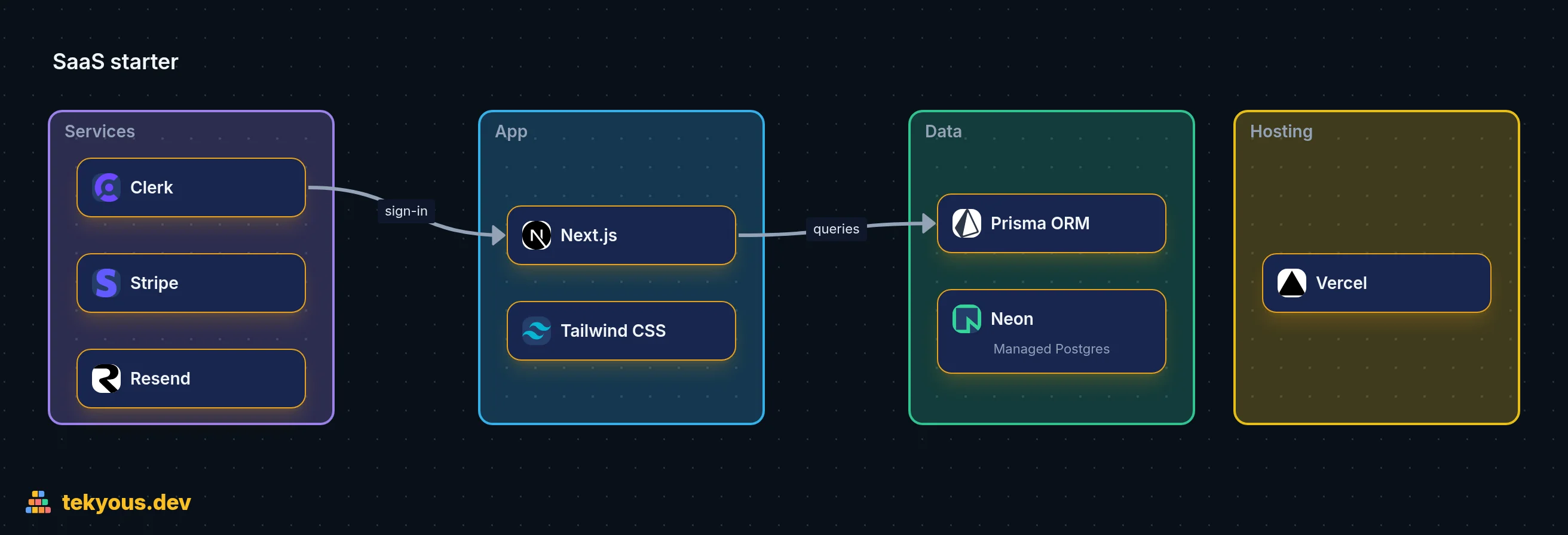
compose_diagram on the live server from an eight-tool spec. Open it in the builder to edit it. Add it to your agent
The server speaks MCP over streamable HTTP at https://mcp.tekyous.dev/mcp. Any client that supports remote MCP servers can use it; these are the common ones.
Claude Code
Run this once in a terminal. --scope user makes the server available in every project; leave it out to add it to the current project only.
claude mcp add --transport http --scope user tekyous https://mcp.tekyous.dev/mcpThen type /mcp in a Claude Code session: tekyous should show as connected.
Three prompts to try
Naming Tekyous in the prompt helps the agent pick the right tools the first time.
1. Diagram the repository you are in
The agent reads the project's manifests, draws the stack, saves the PNG into the repo and adds the picture to the README, linked to the editable diagram.
Use the Tekyous MCP server to draw this project's tech stack, save the image into the repo and add it to the README.2. Get a stack recommendation and see it
recommend_stack answers with the questionnaire's ranked stack; compose_diagram turns it into a picture.
I'm a solo developer building a SaaS with subscriptions. Recommend a stack with Tekyous, explain the choices and draw it as a diagram.3. Draw a stack you describe
Name the tools and how you want them grouped; tools Tekyous does not list are drawn as custom cards.
With Tekyous, draw our stack left to right: React and Vite in the frontend, FastAPI and Celery in the API, PostgreSQL and Redis for data, AWS ECS for hosting. Label the connectors.
What the agent can do with it
Five read-only tools and one prompt. Every result carries tekyous.dev links, so you can check what the agent read.
- search_tools
- Searches the catalogue by text, category, pricing and minimum scores.
- get_tool
- One tool's profile: description, features, pros and cons, pricing, scores with their reasoning, related tools and the stacks that use it.
- get_stack
- A curated stack: core tools per category, its options and additions, scores, pricing, FAQs and a builder link.
- recommend_stack
- The questionnaire's recommendation for a project type and an experience level, with a builder link.
- compose_diagram
- Turns a diagram spec (groups of tools, custom tools, connectors, notes) into a PNG, a builder link and a README snippet.
- design_stack (prompt)
- Tells the agent how to write a good diagram spec, check the warnings and save the picture into a repository.
A diagram comes back as a PNG URL, a builder link, a Markdown snippet for a README (the picture linking to the editable diagram), catalogue warnings such as a missing database or two tools that conflict, and layout issues found in the drawn picture. Agents read the warnings and redraw before showing you the result. The canvas guide covers what you can change once the diagram is open in the builder.
What happens to your diagram
- No account, no cookies. The server receives what your agent sends in each call and the client's name. It never reads your files: a diagram holds only what the agent writes into it.
- A diagram travels inside its image and builder links, compressed but not encrypted: anyone with the link can see it. Keep secrets, credentials and anything private out of names, notes and labels.
- Images are drawn by Cloudflare Browser Run and stored for 30 days, then drawn again from the link when someone opens it.
- Each call is logged without your IP address: the tool, its arguments cut to 300 characters (for a diagram only its title and tool names) and the client's name, kept 90 days. We use it to fix the server and to see what people look for.
The full details are in the privacy policy.
Examples
- SaaS starter: the diagram above, open in the builder
- Tech stack catalogue: the curated stacks get_stack and recommend_stack draw from
- Canvas guide: what you can do with a diagram once it is in the builder
Something broke, or an agent drew something odd? Write to [email protected].